
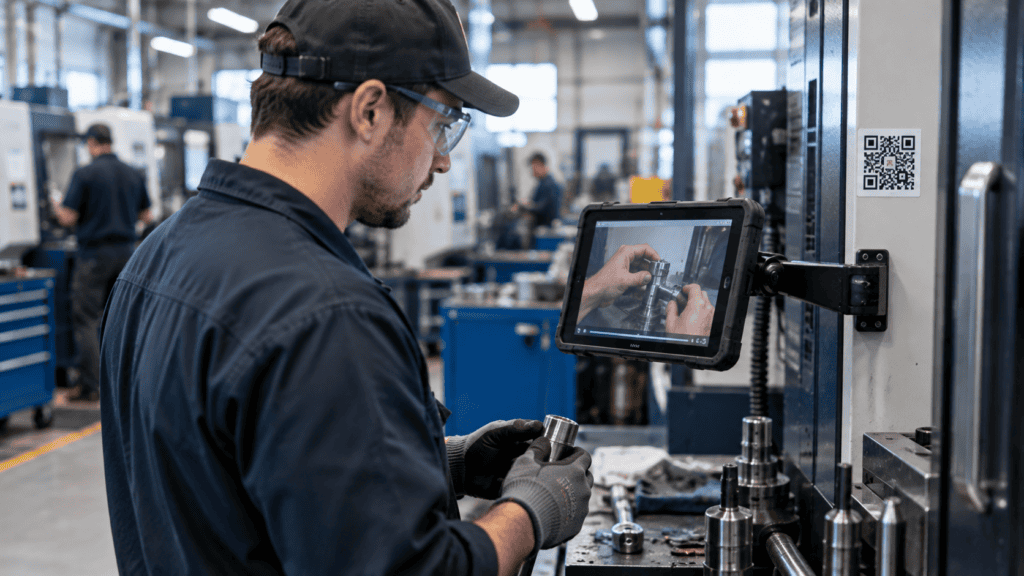
In most plants, production employees have no desk, no computer and no company email address. Yet they are the ones who need the most training: safety, procedures, quality. Sending a link by email doesn’t work, and stopping the line for classroom training is expensive. The solution: bring training to where they already are, on a tablet, a phone or a screen at the workstation, in short modules.
Key takeaways
- Production employees often have no computer or email: training has to come to them, at the workstation or in the break room.
- A 5-minute module with a single goal, filmed on your real machines and subtitled, works better than a long course.
- Time spent on training required by the employer is paid working time, even on a phone.
In this article
The real problem: no computer, no time, no desk
Corporate training was designed for office workers: a computer, an email account, an hour blocked in the calendar. On the plant floor, none of that exists. Shifts overlap, production doesn’t stop, and noise makes videos without subtitles useless.
The result: training happens “on the job”, unevenly depending on the mentor, or in a classroom, pulling employees off the line. Either way, there is rarely clear proof of who learned what.
Three ways to equip the floor
You don’t need a computer per employee. Three options cover most plants:
Tablet at the workstation
A rugged tablet in a mount near the machine or workstation.
Ideal for procedures checked during the work.
Break room kiosk
A touchscreen or shared station in the cafeteria or near the time clock.
Ideal for mandatory training and new hires.
QR code and phone
A QR code on the machine opens the module on a phone.
Handy, but only on a voluntary basis, and the time must be paid.
The 5-minute module: how to design it
On the floor, nobody has 45 minutes to spare. A short module fits into the start of a shift or a waiting period. To make it work:
✅ Do
- One goal per module
- Film the real machine, on your floor
- Add subtitles: plants are noisy
- End with 2 or 3 check questions
- Design for a vertical screen and big buttons
❌ Avoid
- Turning a 60-slide PowerPoint into a video
- Generic stock images
- Small print
- Requiring a login with a complicated password
- One module that covers five topics
The simple rule: if the employee can’t say in one sentence what they just learned, the module covers too much.
QR code at the workstation: just-in-time training
The most effective way to train without computers is to put training exactly where it’s used. Here’s how:
Pick the tasks that cause problems
Format changes, infrequent settings, lockout on a specific machine: the tasks people forget between uses.
Film the task with your best operator
Two to five minutes, on a phone, following the real steps. Your expert talks, the camera shows their hands.
Add subtitles and check points
Key steps on screen, plus two or three questions to confirm understanding.
Stick the QR code on the machine
Clearly visible, protected from oil and dust, with the module’s title.
Track who watched it
When the module runs through a training platform, every view and every answer is recorded.
When to train on the floor
The best moments are the ones that already exist in your production day:
- The start-of-shift meeting: a 5-minute module shown or watched as a team, followed by a short discussion.
- Waiting times: mould changes, waiting for material, maintenance on another machine.
- A new employee’s first week: a series of modules at the kiosk, between shadowing sessions. See our article on onboarding new plant employees.
An important reminder: in Quebec, the Act respecting labour standards (section 57) considers employees to be at work during training required by the employer. A mandatory module is therefore done on paid time, not during breaks.
What digital can’t replace
A module explains and reminds. It doesn’t replace supervised practice, especially for high-risk tasks. The winning model combines both: theory and reminders on screen, practice with a mentor. We cover that balance in online training vs. classroom trainer.
The best training for an employee without a computer is the one they find on their machine, right when they need it.
One last advantage, and not the least: every module completed on a platform leaves a dated record. That’s exactly what you need for your training records and to document your spending under Quebec’s 1% law.
Frequently asked questions
Can an employee be required to use their personal phone?
It’s not recommended. Provide a company device (tablet or kiosk) and keep the phone as a voluntary option. In every case, training time required by the employer must be paid.
Do short modules count toward the 1% law?
Online training is an eligible format, as long as it is documented: content, duration, participants and proof of completion. A training platform keeps this information automatically.
How many modules do I need to start?
Start small: five modules on the tasks that cause the most errors or stoppages. Measure the effect, then add more as needed.
What if my employees aren’t comfortable with technology or reading?
Rely on video, voice and pictograms rather than text. One button to start, simple subtitles and, if needed, versions in other languages.
Want to turn your best operators’ know-how into modules your employees can follow right at the workstation? Witeach films, structures and delivers your training on the floor, with training records included.
